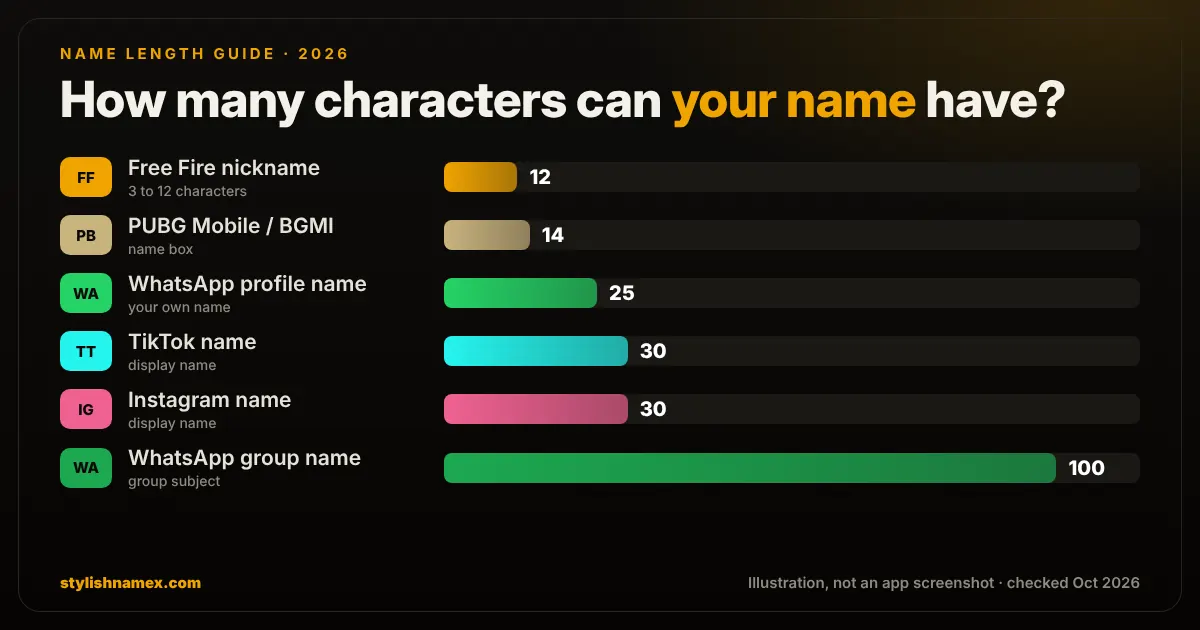
On Instagram, your name is the display name shown in bold on your profile, and your username is the unique @handle in your profile link. Both can be up to 30 characters, but only the name accepts spaces, symbols and stylish fonts; the username takes only letters, numbers, underscores and periods. You can change the name twice in 14 days and the username whenever the new one is free.
People mix the two up all the time, which is why so many stylish names fail with an error: the font or symbol was pasted in the username field instead of the name field. This guide shows the difference side by side, the exact rules for each, how to change both on phone and computer, and ready examples you can copy. To turn your name into 100+ fonts, use our Instagram name style tool.
Quick rule: fonts and symbols go in Name; plain letters, numbers, _ and . go in Username.
Instagram name vs username: the difference
The name is how you look; the username is how Instagram identifies and links to you. This table puts every rule side by side.
| Name (display name) | Username (@handle) | |
|---|---|---|
| What it is | Your display name, shown in bold on your profile | Your @handle, the unique ID of the account |
| Where it shows | Profile, search results, under your photo | Profile link (instagram.com/username), tags, mentions, comments |
| Character limit | Up to 30 | Up to 30 |
| Allowed characters | Letters, spaces, symbols, emoji and stylish fonts | Only letters, numbers, underscores (_) and periods (.) |
| Must be unique? | No, many people can share a name | Yes, no two accounts can have the same username |
| How often you can change it | Twice in 14 days | When it is free; you can usually switch back to the old one for 14 days |
| Used to log in? | No | Yes, together with your email or phone |
| Helps people find you? | Yes, the name is searchable | Yes, people search and tag the @username |
A quick example
On one profile, the name could be 𝐙𝐀𝐈𝐍 ♛ and the username could be @zain_official. Friends see the stylish name in bold at the top of the profile, while the link to share is instagram.com/zain_official. If Zain renames himself to ᴢᴀɪɴ ⚡, his link and tags stay the same; if he changes the username, every old link to his profile stops working.
Instagram name rules
The name can be up to 30 characters and can include spaces, symbols, emoji and Unicode fonts; you can change it twice within 14 days.
- Length: 30 characters. Each symbol counts as one character, and some stylish letters count as two, so test long names.
- Changes: twice in 14 days. After the second change, Instagram makes you wait.
- Search: the name is searchable, so keep your real name or nickname readable inside the style. Heavy fonts can make you harder to find.
- Not unique: anyone can use the same name, so you do not need to check if it is taken.
Not sure what a symbol like ꧁ or ࿐ means before you add it? See cool symbols for names.
Instagram username rules
A username can be up to 30 characters and can use only letters, numbers, underscores and periods, with no spaces and no symbols. It must be unique on Instagram.
- Allowed: a to z, 0 to 9, underscore (_) and period (.). Instagram shows usernames in lowercase.
- Not allowed: spaces, emoji, symbols such as ♛ or ꧁, and stylish fonts such as 𝐙𝐀𝐈𝐍.
- Periods: a username cannot start or end with a period, and two periods cannot sit next to each other.
- Unique: if another account has it, add a word, a period or an underscore, for example zain.official or zain_ff.
- Switching back: after a change, Instagram usually lets you return to your old username for 14 days; after that, someone else can claim it.
How to change your Instagram name
Open your profile, tap Edit profile, tap Name, type or paste the new name and save. The same field is also in Accounts Center.
On the Instagram app
- Tap your profile picture at the bottom right.
- Tap Edit profile.
- Tap Name and paste your stylish name.
- Tap the check mark (iPhone) or Done (Android) to save.
On a computer
- Open instagram.com and log in.
- Open More, then Settings, then Accounts Center.
- Go to Profiles, pick your Instagram profile and click Name.
- Paste the new name and click Done.
How to change your Instagram username
Go to Edit profile, tap Username, type a new handle using only letters, numbers, _ and ., and save once Instagram shows it is available.
- Tap your profile picture, then Edit profile.
- Tap Username.
- Type the new username. A tick means it is free; an error means it is taken or has a character that is not allowed.
- Save with the check mark or Done.
- Update the link in your other bios, because the old instagram.com link no longer opens your profile.
Stylish name and username ideas to copy
Use a stylish name in the Name field and a clean, matching handle in the Username field. Tap any name to copy it.
Stylish Instagram names for girls
- ᴢᴀʀᴀ ♡
- 𝓐𝔂𝓪 ✿
- ɴᴏᴏʀ ࿐
- ꧁ᴍᴀʀʏᴀᴍ꧂
- 𝐇𝐢𝐛𝐚 ☾
- ʚ ꜱᴀʀᴀ ɞ
- ꜱᴏꜰɪᴀ ✧
- 𝘔𝘢𝘩𝘪𝘳𝘢 ♡
- ᴀɪᴍᴀ ⋆˚
- 𝒜𝓁𝒾𝓃𝒶
Stylish Instagram names for boys
- ᴀʟɪ ⚡
- 𝐙𝐀𝐈𝐍 ♛
- ꧁ʀᴏʜᴀɴ꧂
- ᴹᴿ᭄ʜᴀᴍᴢᴀ
- 𝕬𝖗𝖞𝖆𝖓
- ᴀʜᴍᴀᴅ ϟ
- 𝙐𝙨𝙢𝙖𝙣 ★
- ꜰᴀʀʜᴀɴ ⚔
- 𝓡𝓪𝔂𝓪𝓷
- ᴅᴀɴɪʏᴀʟ ✦
Clean username ideas (letters, numbers, _ and . only)
- zara.creates
- noor_aesthetic
- its.aya_
- hiba.writes
- sara.daily
- ali.shoots
- zain_official
- rohan.edits
- hamza.fit
- aryan_vibes
- usman.travels
- rayan.codes
- the.mahira
- soft.sofia
- ahmad.ff
Want more? The Instagram name style generator makes 100+ fonts from your own name, and aesthetic names has soft Gen Z styles.
Common errors and how to fix them
Most errors come from symbols in the username, a taken handle or changing the name too often.
| Message or problem | Why it happens | Fix |
|---|---|---|
| “Usernames can only use letters, numbers, underscores and periods” | A space, symbol or stylish font was typed in the username | Move the stylish text to the Name field and keep the username plain |
| “This username isn’t available” | Another account already uses it | Add a period, underscore or short word, such as .official or _ff |
| “You can’t change your name right now” | You already changed the name twice in 14 days | Wait until the 14 days pass |
| Name shows boxes on some phones | That phone has no font for a symbol | Use common symbols such as ♡ ★ ✦ or small capitals |
| People cannot find you in search | The style hides your real name | Keep one plain part, for example ZARA ♡ instead of all fancy letters |
Limits for TikTok, Free Fire, PUBG and WhatsApp are on our name character limits page.
Need a line for the bio field too? Copy one from our stylish bio list of 150+ lines.
Frequently asked questions
What is the difference between name and username on Instagram?
The name is your display name, shown in bold on your profile, and it can include spaces, symbols and stylish fonts. The username is your unique @handle used in your profile link, tags and login, and it can only use letters, numbers, underscores and periods.
How many characters can an Instagram name have?
An Instagram name can have up to 30 characters. Symbols count as one character each, and some stylish font letters count as two, so test long names before saving.
How many characters can an Instagram username have?
An Instagram username can have up to 30 characters, using only letters, numbers, underscores and periods.
How often can I change my Instagram name?
You can change your Instagram name twice within 14 days. After that, Instagram asks you to wait until the 14 days pass.
Can I use stylish fonts in my Instagram username?
No. Stylish fonts, symbols, emoji and spaces work only in the Name field. The username accepts only plain letters, numbers, underscores and periods.
Can I get my old Instagram username back?
Usually yes, if you switch back within 14 days of changing it. After that, the old username is released and anyone can take it.
Does changing my Instagram name change my profile link?
No. Your profile link uses your username, so changing only the name keeps your link, tags and mentions the same.
Why does Instagram say my username is not available?
Another account already uses that username, or it contains a character that is not allowed. Add a period, an underscore or a short word, such as zara.official or zara_ff.