StylishNameX is a free FB nickname and Facebook stylish name generator, also used as an FB stylish name maker and Facebook font tool. Type a name and it turns it into Unicode fonts, frames and symbols you can paste into a Messenger nickname, your Facebook bio, posts and comments. It also checks your real profile name against Facebook's name standards rule by rule, fixes common problems, and makes profile-safe versions with accented letters.
What Is an FB Nickname (Facebook Nickname)?
An FB nickname is a short or fun name you use on Facebook besides your real name: either a nickname added under "other names" on your profile, or a nickname you give a friend in a Messenger chat. A Facebook stylish name is the same name written in Unicode fonts and symbols, such as ꧁𝓐𝓵𝓲꧂ or ♡ ᴀʏᴇꜱʜᴀ ♡.
The styled letters are real text characters, not images, so you can copy them here and paste them anywhere Facebook lets you type freely. People also call this a Facebook nickname, FB name style, stylish name for FB, fancy name for Facebook or FB font. They all mean the same idea: your name, restyled.
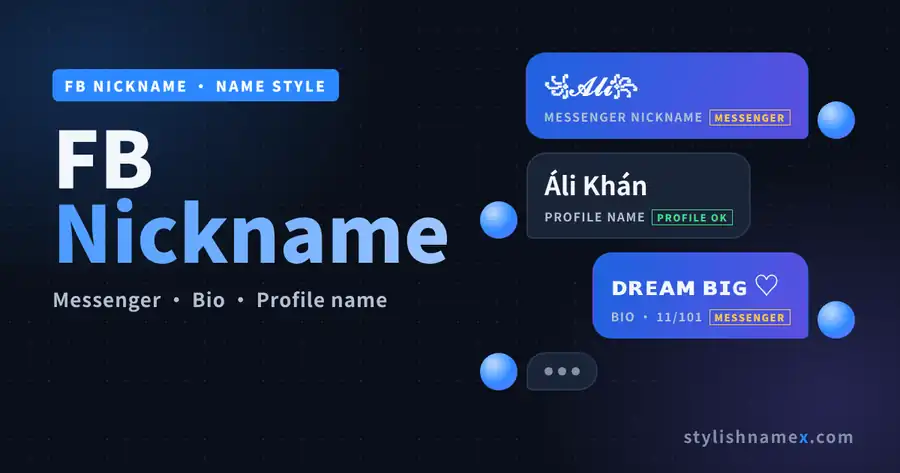
IN SHORT: an FB nickname is an extra name on your profile or in Messenger. Style it here, copy it, and paste it where fancy text is allowed.
Where Stylish Names Work on Facebook
Stylish fonts work in Messenger nicknames, your bio, posts and comments, but not in your Facebook profile name or username. Facebook checks profile names against its name standards and rejects symbols and fancy letters. Most font sites skip this, which is why their names fail when you try to save them.
| Place on Facebook | Stylish fonts? | What to use |
|---|---|---|
| Profile name (first, middle, last) | No | A real-looking name. Use the Profile safe tab |
| Other names: nickname | Plain only | A real nickname like Sunny or Bobby. It is always public |
| Messenger chat nickname | Yes | Any style, symbols and emoji. Everyone in the chat sees it |
| Bio | Yes | Up to 101 characters, always public |
| Posts and comments | Yes | Style one word or a short line so it stays readable |
| Username (facebook.com/name) | No | Letters, numbers and periods only, 5 to 50 characters |
Each result in the tool shows a badge so you do not have to guess: PROFILE OK means it has the shape of a name Facebook can accept, and MESSENGER means it is for Messenger, your bio, posts and comments.
Does a Facebook font work everywhere?
A Facebook font is not a real font setting; it is Unicode letters that look styled. That is why an FB font shows up in posts, comments, your bio and Messenger, but Facebook's name check rejects it in your profile name. If a style shows boxes on some phones, pick small caps or bubble letters instead.
IN SHORT: keep your profile name real, and put the stylish version in Messenger, your bio and your comments.
How to Use the FB Nickname Generator
Type your first and last name at the top, read the checker, then copy a profile-safe name for your profile or a stylish nickname for Messenger. Results update while you type, so there is no Generate button.
- Type your name. First name and last name in their own boxes, plus an optional Messenger nickname.
- Read the checker. Five rules turn green or red: one alphabet, normal capitals, no tripled letters, no stray punctuation and the length. If a rule fails, tap Fix my name.
- Pick a tab. Profile safe gives real-looking versions with accented letters. Messenger nicknames gives fonts and symbols. Bio and comment names gives ready lines with your name.
- Try, copy or share. Tap Try to see a name on the profile illustration, Copy to copy it, or Name card to download a card.
Quick examples
| You type | You get | Style | Badge |
|---|---|---|---|
| Ali | ꧁𝓐𝓵𝓲꧂ | Royal | MESSENGER |
| Ayesha | ♡ ᴀʏᴇꜱʜᴀ ♡ | Girls | MESSENGER |
| Hamza | ᴹᴿ᭄ʜᴀᴍᴢᴀ | Attitude | MESSENGER |
| Sana | Baby 𝓢𝓪𝓷𝓪 | Messenger | MESSENGER |
| Ali Khan | Áli Khán | Profile safe | PROFILE OK |
IN SHORT: type, check, copy, paste. Use Profile safe for your profile name and the other tabs for Messenger and your bio.
Facebook Name Rules (2026)
Your Facebook profile name must be the name you use in everyday life, written without symbols, numbers, unusual capitalization, repeated characters or a mix of alphabets, and you can change it only once every 60 days.
| Rule | What it means for you |
|---|---|
| No symbols, numbers or punctuation | ꧁ ꧂, ♡, 007 and fancy Unicode letters like 𝓐𝓵𝓲 are rejected |
| No unusual capitalization | ALI KHAN or aLi kHaN will not pass. Write Ali Khan |
| No repeated characters | Aliii or Sanaaa are flagged |
| One alphabet only | All Latin, or all Bangla, Hindi or Urdu script. Not a mix like Ali আলী |
| No titles or phrases | Dr., Prince, King or "Silent Killer" in place of a name are not allowed |
| Nickname as first name | Allowed if it is a form of your real name, like Bob for Robert |
| Name changes | After a change you must wait 60 days to change it again |
| Other names | Nickname, maiden name or professional name can be added and are always public |
| Bio | Up to 101 characters. Fancy fonts and emoji are fine here |
| Username | 5 to 50 characters: letters, numbers and periods |
Facebook may also ask you to confirm your name with an ID if a name looks fake. That is why the safest stylish profile name is your real name with small changes, such as an accent on one letter, rather than a fully styled one.
IN SHORT: real name, normal capitals, one alphabet, no symbols, and one change every 60 days.
Facebook Acceptable Stylish Names
A Facebook-acceptable stylish name keeps your real name and normal capitals but adds accented letters such as á, é, ö or ñ, for example Áli Khán or Ayésha Málik. Accented letters are normal Latin letters used in many real names, so they pass the format check where fancy fonts fail. Facebook still reviews names, so treat these as "most likely to pass", not guaranteed. Use them for your FB ID name, the name at the top of your profile.
| Name | Style | Profile name? |
|---|---|---|
| Ali Khan | Your real name | Likely OK |
| Áli Khán | Acute accents | Likely OK |
| Ayésha Málik | Acute accents | Likely OK |
| Hämza Ähmed | Umlauts | Likely OK |
| Sãña Mãlik | Tilde | Likely OK |
| ALI KHAN | All capitals | Rejected |
| aLi kHaN | Mixed capitals | Rejected |
| Aliii Khan | Tripled letter | Rejected |
| Ali Khan 007 | Numbers | Rejected |
| 𝓐𝓵𝓲 𝓚𝓱𝓪𝓷 | Unicode font | Rejected |
| Ali ♡ Khan | Symbol | Rejected |
| Ali আলী | Two alphabets | Rejected |
The Profile safe tab in the tool makes these for your own name in up to twelve versions, and each one is checked against the same rules before you see it.
IN SHORT: for your profile name, change letters, not the style: an accent or two on a real name is the stylish look Facebook accepts most often.
How to Add a Nickname on Facebook
Go to Settings, Accounts Center, Profiles, your profile, Name, then Manage other names; choose Nickname, type it, turn on Show at top of profile if you want, and tap Save. The nickname then shows in brackets after your name, for example Muhammad Ali (Sunny).
In the Facebook app
- Tap Menu, then Settings and privacy, then Settings.
- Tap Accounts Center (it may say Meta Account), then Profiles, then your Facebook profile.
- Tap Name, then Manage other names.
- Choose Nickname as the name type and type the nickname.
- Turn on Show at top of profile if you want it next to your name, and tap Save.
On a computer
Open your profile, click About, then Names, then Add other names. Pick Nickname, type it, and save.
How to remove a nickname on Facebook
On a computer, open your profile, click About, then Names, click Edit next to the nickname, then Remove, and confirm. In the app, open Manage other names, tap the nickname and delete it.
Other names are always public, even when they are not shown at the top of your profile, and they help people find you in search. Use a nickname people actually call you, written in plain letters.
IN SHORT: Accounts Center, Profiles, Name, Manage other names, Nickname, Save. Remove it from About, Names, Edit.
How to Set a Nickname in Messenger
Open the chat, tap the name at the top, tap Nicknames, choose a person, paste the nickname and tap Set. Messenger nicknames accept stylish fonts, symbols and emoji, so every MESSENGER result in the tool works as a nickname for FB chats.
- Open Messenger and the chat you want.
- Tap the person's or group's name at the top.
- Tap Nicknames and choose who to rename. You can set your own nickname too.
- Paste the nickname you copied here and tap Set.
Everyone in the chat sees the nickname and can change it, and Messenger posts a note that it was changed. To clear one, follow the same steps and tap Remove.
Funny Messenger nicknames
| Nickname | Length |
|---|---|
| Chotu Don 😎 | 11/50 |
| Sleeping Beauty 😴 | 17/50 |
| Biryani Lover 🍛 | 15/50 |
| Captain Late ⏰ | 14/50 |
| Mr. Selfie 🤳 | 12/50 |
| Drama Queen 👑 | 13/50 |
| Battery Low 🔋 | 13/50 |
| Chai Addict ☕ | 13/50 |
| Google Baba 🧠 | 13/50 |
| Kumbhkaran 💤 | 12/50 |
Cute nicknames for best friends
| Nickname | Length |
|---|---|
| ʙᴇꜱᴛɪᴇ ♡ | 8/50 |
| ᴘᴀʀᴛɴᴇʀ ɪɴ ᴄʀɪᴍᴇ 🤝 | 18/50 |
| Sunshine ☀ | 10/50 |
| Cutie Pie 🧁 | 11/50 |
| ꜱᴏᴜʟ ꜱɪꜱᴛᴇʀ ✿ | 13/50 |
| Brother From Another Mother | 27/50 |
| Jaan 💙 | 6/50 |
| Little Panda 🐼 | 14/50 |
IN SHORT: chat, name at the top, Nicknames, person, paste, Set. Anything goes in Messenger, including fonts and emoji.
How to Change Your Name on Facebook
To do an FB name change, open Settings, then Accounts Center, Profiles, your profile and Name; type the new name, tap Review change and then Save changes. After that you must wait 60 days to change it again.
- In the Facebook app, tap Menu, Settings and privacy, then Settings.
- Tap Accounts Center (or Meta Account), then Profiles, then your Facebook profile.
- Tap Name and edit the first, middle or last name. Paste a name from the Profile safe tab if you want a stylish but accepted look.
- Tap Review change, choose how your name appears, and tap Save changes.
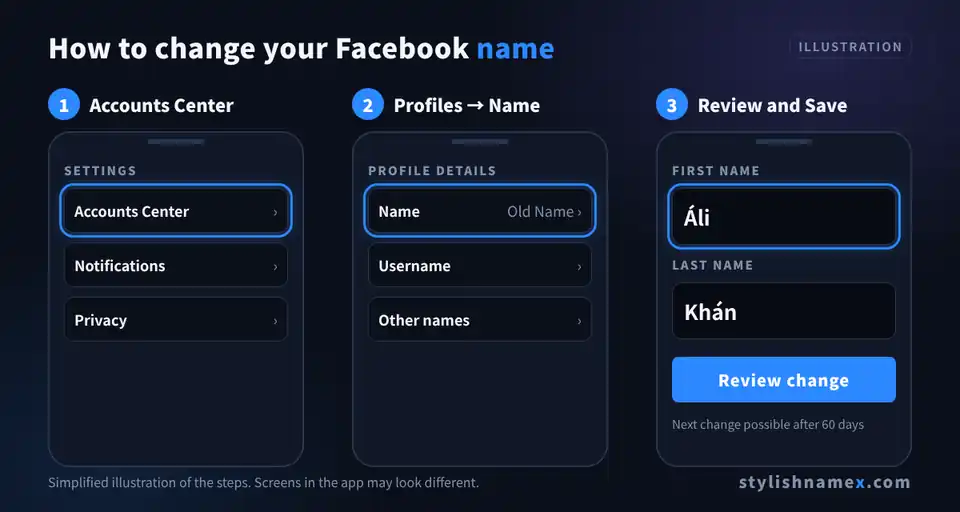
Facebook par naam kaise change kare
Facebook app mein Menu, Settings and privacy, Settings kholein. Phir Accounts Center, Profiles, apni profile aur Name par tap karein. Naya naam likhein, Review change aur Save changes dabayen. Yaad rakhein: 60 din tak dobara naam change nahi hota, is liye pehle hi sahi naam chunein.
On a computer the path is the same: click your profile picture, Settings and privacy, Settings, Accounts Center, Profiles, your account, Name. Your username, Page name and Instagram name are changed separately.
IN SHORT: Settings, Accounts Center, Profiles, Name, Review change, Save changes, then a 60-day wait.
Stylish FB Name Ideas
The most used stylish FB names are royal frames like ꧁ ꧂, attitude tags like ᴹᴿ᭄, soft girly frames like ♡ ♡, and king names with ♛ or 👑. Every name below was made with the tool on this page, in the FB name style people search for most. Tap any name to copy it, then use it as a Messenger nickname or in your bio.
Stylish FB names for boys
| Name | Length | Badge |
|---|---|---|
| ᴹᴿ᭄ʜᴀᴍᴢᴀ | 8/50 | MESSENGER |
| ꧁𝓐𝓵𝓲꧂ | 5/50 | MESSENGER |
| ☬ᴜꜱᴍᴀɴ☬ | 7/50 | MESSENGER |
| 𝐙𝐀𝐘𝐍 ⚡ | 6/50 | MESSENGER |
| ʙᴏꜱꜱ乂ᴀʀʏᴀɴ | 10/50 | MESSENGER |
| 𝕯𝖆𝖓𝖎𝖞𝖆𝖑 😎 | 9/50 | MESSENGER |
Stylish FB names for girls
| Name | Length | Badge |
|---|---|---|
| ♡ ᴀʏᴇꜱʜᴀ ♡ | 10/50 | MESSENGER |
| ᴹᴵˢˢ𝓢𝓪𝓷𝓪 🎀 | 10/50 | MESSENGER |
| ✿ ʜɪʀᴀ ✿ | 8/50 | MESSENGER |
| ᵠᵘᵉᵉⁿ ᴍᴀʀʏᴀᴍ 👑 | 14/50 | MESSENGER |
| ʚ𝓘𝓺𝓻𝓪ɞ | 6/50 | MESSENGER |
| ɴᴏᴏʀ 🦋 | 6/50 | MESSENGER |
FB king names
| Name | Length | Badge |
|---|---|---|
| ♛ ᴋɪɴɢ ʀᴀᴊ ♛ | 12/50 | MESSENGER |
| ꧁༒☬ꜱᴜʟᴛᴀɴ☬༒꧂ | 12/50 | MESSENGER |
| ᴷᴵᴺᴳ亗ᴀʟɪ | 8/50 | MESSENGER |
| 👑 𝕽𝖆𝖏𝖆 👑 | 8/50 | MESSENGER |
| ♚ᴀʀʜᴀᴍ♚ | 7/50 | MESSENGER |
Clean names
No frames, only restyled letters. Best for a short bio line or a comment signature.
| Name | Length | Badge |
|---|---|---|
| Hᴀᴍᴢᴀ | 5/50 | MESSENGER |
| ᴀʏᴇꜱʜᴀ | 6/50 | MESSENGER |
| Zayn | 4/50 | MESSENGER |
| Ⓢⓐⓝⓐ | 4/50 | MESSENGER |
| 𝙰𝚕𝚒 | 3/50 | MESSENGER |
IN SHORT: boys' names use ᴹᴿ and bold letters, girls' names use ♡ and ᴹᴵˢˢ, king names use ♛ or 👑, and clean names keep only the styled letters.
Bangla Nicknames for FB
Popular Bangla nicknames for FB are short, sweet words like আকাশ (Akash, sky), মেঘ (Megh, cloud), পরী (Pori, fairy) and সোনা (Shona, darling). Tap a Bangla name to copy it. A profile name written fully in Bangla script is allowed; mixing Bangla and English letters in one name is not.
| Bangla | Say it | Meaning | Good for |
|---|---|---|---|
| আকাশ | Akash | Sky | Boys |
| মেঘ | Megh | Cloud | Boys, girls |
| চাঁদ | Chand | Moon | Girls, Messenger |
| তারা | Tara | Star | Girls |
| নীল | Neel | Blue | Boys |
| সূর্য | Surjo | Sun | Boys |
| বৃষ্টি | Brishti | Rain | Girls |
| পরী | Pori | Fairy | Girls |
| প্রজাপতি | Projapoti | Butterfly | Girls, Messenger |
| রাজা | Raja | King | Boys, Messenger |
| রাজকুমারী | Rajkumari | Princess | Girls, Messenger |
| সোনা | Shona | Gold, darling | Messenger |
| বাবু | Babu | Dear one | Messenger |
| দুষ্টু | Dushtu | Naughty | Messenger, funny |
| ঝিলিক | Jhilik | Sparkle | Girls |
Want a frame around a Bangla nickname? Paste it into the editor (tap any result in the tool), delete the name part and paste the Bangla word between the symbols, for example ꧁ আকাশ ꧂ or ♡ পরী ♡.
IN SHORT: Bangla nicknames like আকাশ, মেঘ and পরী work in Messenger and your bio; a profile name must be all Bangla or all English, not both.
Stylish FB Bio Ideas
A stylish FB bio is a short line of up to 101 characters, often with one styled word and one or two emoji, like "ᴍʀ ᴀᴛᴛɪᴛᴜᴅᴇ 😎 | Born to shine". The bio is always public, so keep personal details like your phone number out of it.
| Bio | Length |
|---|---|
| ꧁ Simple boy with big dreams ꧂ | 30/101 |
| ♡ Coffee, books & late-night talks ♡ | 36/101 |
| ᴍʀ ᴀᴛᴛɪᴛᴜᴅᴇ 😎 | Born to shine | 29/101 |
| ʟɪᴠᴇ • ʟᴀᴜɢʜ • ʟᴏᴠᴇ ✨ | 21/101 |
| Not perfect, just original ✌ | 28/101 |
| 👑 Queen of my own world 👑 | 25/101 |
| Family first ❤ Friends forever | 30/101 |
| Silent but deadly ☠ | 19/101 |
| ᴅʀᴇᴀᴍ ʙɪɢ • ᴡᴏʀᴋ ʜᴀʀᴅ • ꜱᴛᴀʏ ʜᴜᴍʙʟᴇ | 35/101 |
| Proud Pakistani 🇵🇰 | Cricket lover 🏏 | 36/101 |
| Shy at first, crazy later 🙈 | 27/101 |
| ✿ ꜱᴍɪʟᴇ ɪꜱ ᴍʏ ꜱᴛʏʟᴇ ✿ | 21/101 |
To add one, open your profile, tap Edit profile, then Bio (on a computer it is under Intro), paste the line and save. Emoji count as one or two characters, so check the length above before you paste.
IN SHORT: one styled word, one emoji, under 101 characters, and nothing private.
Symbols for FB Names and Nicknames
The most used symbols in FB nicknames are ꧁ ꧂, ♡, ✿, ♛, ☬, 亗, ᴹᴿ᭄ and emoji like 😎, 👑 and 💙. They work in Messenger, your bio, posts and comments, but not in your profile name.
| Symbol | Look | Characters it takes | Typical use |
|---|---|---|---|
| ꧁ ꧂ | Royal wings | 2 (pair) | Boys, royal |
| ♡ ♡ | Hearts | 2 (pair) | Girls, cute |
| ✿ | Flower | 1 | Girls, cute |
| ♛ ♚ | Crown, king | 1 each | King names |
| ☬ | Khanda | 1 | Royal, attitude |
| 亗 | Gamer mark | 1 | Gaming, attitude |
| ᴹᴿ᭄ | Mr tag | 3 | Boys, attitude |
| ᴹᴵˢˢ | Miss tag | 4 | Girls |
| 😎 👑 💙 | Emoji | 1 to 2 each | Messenger, bio |
Common Problems and Quick Fixes
Most FB name problems come from five causes: fancy fonts in the profile name, unusual capitals, the 60-day wait, a name that looks fake, or symbols some phones cannot show.
| Problem | Why it happens | Fix |
|---|---|---|
| Name rejected for symbols or characters | You pasted a Unicode font into your profile name | Use the Profile safe tab, and put the stylish version in Messenger or your bio |
| Name box is locked | You changed it less than 60 days ago | Wait out the 60 days, or add a nickname under Other names in the meantime |
| Name rejected for capitals | ALL CAPS or MiXeD capitals | Write it as a normal name: Ali Khan |
| Facebook asks for ID | The name looks fake or does not match you | Use your real name; keep styles for your nickname and bio |
| Letters show as boxes □□ | The viewer's phone has no font for that character | Use small caps, bubble letters or common symbols |
| People cannot find me | Search matches normal letters | Keep your real name plain so friends can search for it |
IN SHORT: real name on the profile, stylish name in Messenger and the bio, and plan around the 60-day limit.
Frequently Asked Questions
Can I use a stylish font name on my Facebook profile?
Usually not. Facebook's name standards do not allow symbols, numbers, unusual capitalization, repeated characters or characters from several languages in your profile name, so fancy Unicode fonts are rejected or later flagged. Use the stylish styles for your Messenger nickname, bio, posts and comments, and the PROFILE SAFE tab for your real profile name.
What is a nickname on Facebook?
On Facebook, a nickname is one of your "other names": a short or alternate name, such as Bob for Robert, that you add to your profile in addition to your real name. You can also show it at the top of your profile, where it appears in brackets after your name. A separate kind of nickname is the one you set for a friend inside a Messenger chat.
How do I add a nickname on Facebook?
In the app, open Settings, then Accounts Center (or Meta Account), then Profiles, choose your Facebook profile, tap Name, then Manage other names. Pick Nickname as the name type, type it, turn on Show at top of profile if you want, and tap Save. On a computer, open your profile, click About, then Names, then Add other names.
How do I remove a nickname on Facebook?
On a computer, open your profile, click About, then Names, click Edit next to the nickname, then Remove, and confirm. In the app, go to Name, then Manage other names, open the nickname and delete it.
How do I set a nickname in Messenger?
Open the chat, tap the person's name at the top, tap Nicknames, choose the person, type or paste the nickname and tap Set. Everyone in that chat can see it, and Messenger posts a note in the chat that the nickname was changed.
How often can I change my Facebook name?
After you change your profile name, Facebook makes you wait 60 days before you can change it again. Nicknames under other names and Messenger nicknames do not have this 60-day wait.
Why does Facebook not accept my stylish name?
Facebook rejects names with symbols, numbers, punctuation, unusual capitalization like aLi or ALI, tripled letters, mixed alphabets, titles, offensive words, or words used in place of a name. Styled Unicode letters such as 𝓐𝓵𝓲 count as symbols. A name that looks like a real name you use in everyday life has the best chance.
Can I have a single name on Facebook?
Only in some cases. Facebook reviews single-name requests through its name change form, where you enter the same word in the first and last name boxes, and it may ask for ID. An invisible character trick to hide your last name usually breaks the name rules.
How many characters can a Facebook bio have?
A Facebook profile bio can be up to 101 characters, and it is always public. Fancy fonts and emoji work in the bio, so it is a good place for your stylish name.
Facebook par naam kaise change kare?
Facebook app kholein, Menu, Settings and privacy, Settings, phir Accounts Center, Profiles, apni profile, Name. Naya naam likhein, Review change dabayen aur Save changes karein. Naam change karne ke baad 60 din tak dobara change nahi hota.
Are Facebook other names and nicknames public?
Yes. Facebook says other names are always public: even if you do not show one at the top of your profile, it appears in your About section and can help people find you in search.
Is this FB nickname generator free and safe?
Yes, it is free, needs no sign-up and never asks for your Facebook login. Names are made in your browser; only an anonymous style number is counted when you copy, to build the Popular tab.
Styling a name for somewhere else? Try the TikTok name style generator, the Free Fire name style generator or the PUBG name style generator.